
Let’s be honest for a moment. How would you feel if your laptop got stolen today? Or if ransomware locked all your files? Or your phone fell into the ocean? 🌊📱
For most people, that feeling is pure dread. 😰 Because your files photos of your kids, tax documents, business invoices, that novel you’ve been writing are irreplaceable.
Yet most people still don’t have a proper cloud backup. They rely on luck, or maybe a dusty external hard drive from 2019. 🧨
That’s a disaster waiting to happen.
In 2026, cloud backup isn’t a luxury it’s a necessity. And IDrive is one of the most popular names in the space. But is it actually any good? Or just clever marketing?
In this IDrive Review 2026, I’ll walk you through everything: IDrive features, IDrive pricing, IDrive cloud backup for multiple devices, security, restore options, and most importantly whether it’s the right fit for you (whether you’re a freelancer, a family of five, or a small business owner).
Consider this your practical, no-fluff buying guide. Let’s dive in! 🏊♂️
1. What Is IDrive? — Quick Overview 🧠
In simple terms, IDrive is an online cloud backup service that lets you back up multiple computers, phones, tablets, and even external drives into one single account. ☁️
Unlike Google Drive or Dropbox (which are primarily for syncing and collaboration), IDrive is built first and foremost for backup meaning it keeps safe copies of your files in case something goes wrong with your original devices.
IDrive was founded in 1995 and is based in California, USA. 🇺🇸 Over the years, it has earned multiple Editors’ Choice awards from PCMag and other major tech publications. 🏆
Who is IDrive for? 🎯
👨👩👧👦 Families — back up everyone’s devices under one account
💻 Freelancers & creators — protect your work across laptop + phone
🏢 Small businesses — backup for team computers, servers, NAS devices
📸 Photographers & videographers — large storage at affordable prices
🧑💻 IT admins — remote management for multiple machines
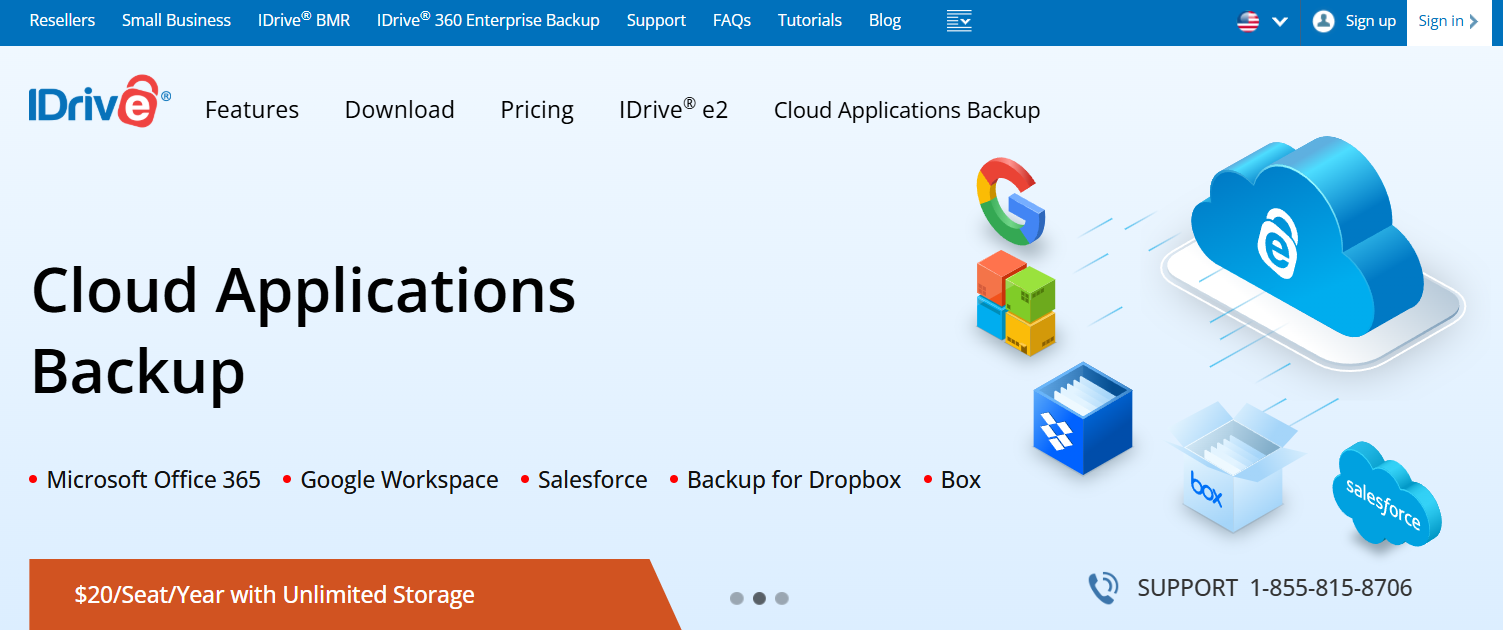
And here’s the key difference: IDrive is not just another cloud storage app. It’s a true backup solution with versioning, snapshots, disk imaging, and disaster recovery features. 🔧
🔹How IDrive Works for Cloud Backup ⚙️
IDrive is refreshingly straightforward. Here’s how it works in 5 simple steps: 👇
1️⃣ Create an IDrive account — free tier available (10 GB, no credit card required). 🆓
2️⃣ Install the desktop or mobile app — available for Windows, macOS, Linux, iOS, and Android. 📱💻
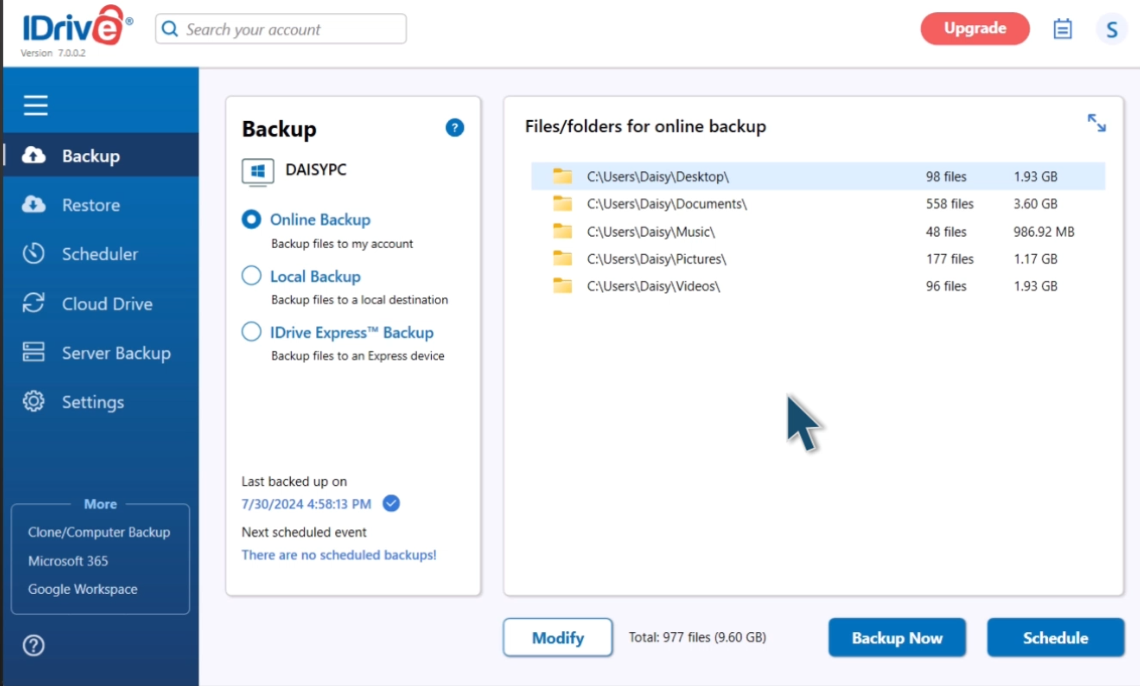
3️⃣ Select what to back up — choose specific files, folders, entire drives, or even the whole system. 📂
4️⃣ Set your backup schedule — continuous, daily, weekly, or manually. ⏰
5️⃣ Restore when needed — download files, use IDrive Express for physical drive restore, or recover from snapshots. 🔄
🔹Backup vs Sync vs Storage — Simple Difference 🧠
| Type | Meaning | Example |
|---|---|---|
| Backup 🛡️ | Saves a copy of your data for recovery | Restore files after laptop crash |
| Sync 🔄 | Keeps files updated across devices | Same folder appears on laptop and phone |
| Storage 📦 | Stores files in the cloud manually | Upload files like a digital drive |
IDrive’s main strength is backup, but it also includes Cloud Drive sync, where files and folders can sync in real time across linked devices.
Quick Takeaway ✅
IDrive is useful because it can back up your data automatically and help you restore it when something goes wrong whether it is accidental deletion, device failure, or file corruption.
2. IDrive Key Features Explained 🛠️☁️
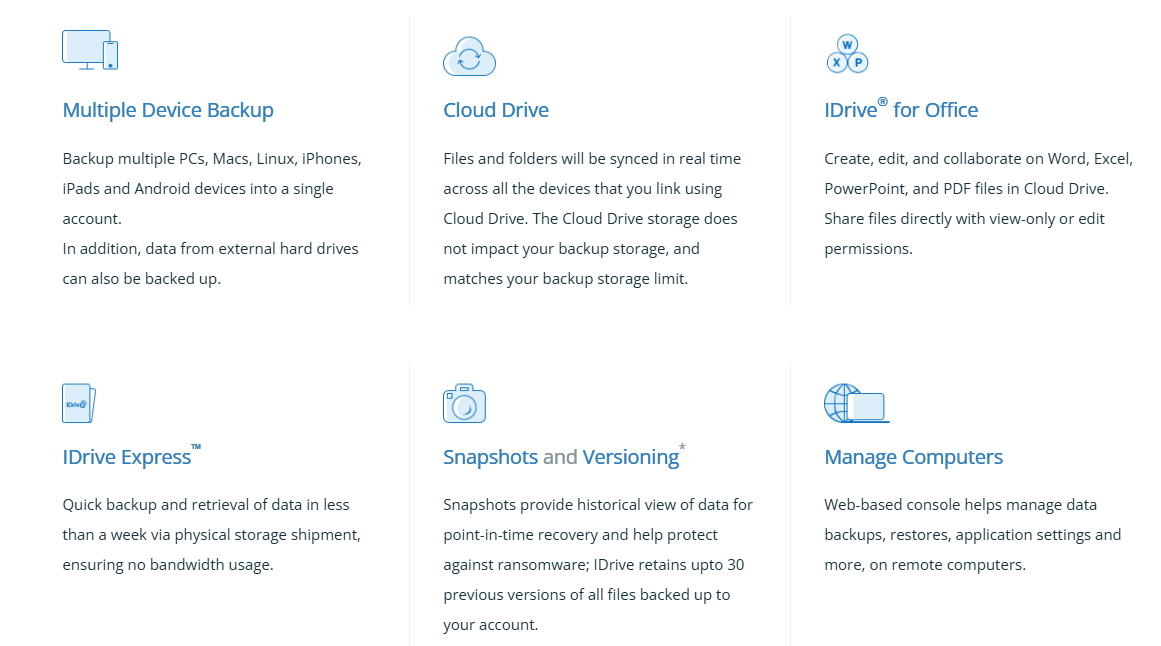
IDrive comes with many backup-focused features that help users protect files, restore older versions, and manage multiple devices from one account. Its biggest strength is that it is not limited to one computer — you can back up PCs, Macs, Linux machines, iPhones, iPads, Android devices, and external drives under one account.
🔹Main IDrive Features 📌
| IDrive Feature | What It Means | Why It Helps |
|---|---|---|
| Multiple Device Backup 💻 | Back up computers, mobiles, and external drives | Useful for families, freelancers, and teams |
| Scheduled Backup ⏰ | Set automatic backup times | Reduces manual backup work |
| Continuous Data Protection 🔄 | Detects file changes and backs them up | Helps keep recent work protected |
| File Versioning 🕒 | Keeps up to 30 previous file versions | Useful if a file is edited, damaged, or infected |
| Snapshots 🛡️ | Shows historical backup points | Helps with ransomware recovery |
| True Archiving 📦 | Cloud files are not deleted automatically when local files are removed | Helps prevent accidental data loss |
| External Drive Backup 💾 | Back up external hard drives | Useful for photographers and creators |
| Hybrid Backup 🔁 | Combine local and cloud backup | Faster recovery for large files |
| Web Access 🌐 | Access and restore files from a browser | Helpful when your main device is unavailable |
| Sync & Sharing 🔗 | Sync files across devices and share links | Useful as an added cloud drive feature |
Practical Example 🧪
A video creator can use IDrive to back up:
- Laptop project files 💻
- External hard drive footage 💾
- Phone photos and videos 📱
- Older file versions 🕒
- Deleted files from previous backups 📦
If the external drive fails or ransomware affects the laptop, IDrive’s snapshots and versioning can help restore earlier clean versions of files. IDrive says snapshots provide a point-in-time recovery view and help protect against ransomware.
3. IDrive Pricing & Plans Explained 💰
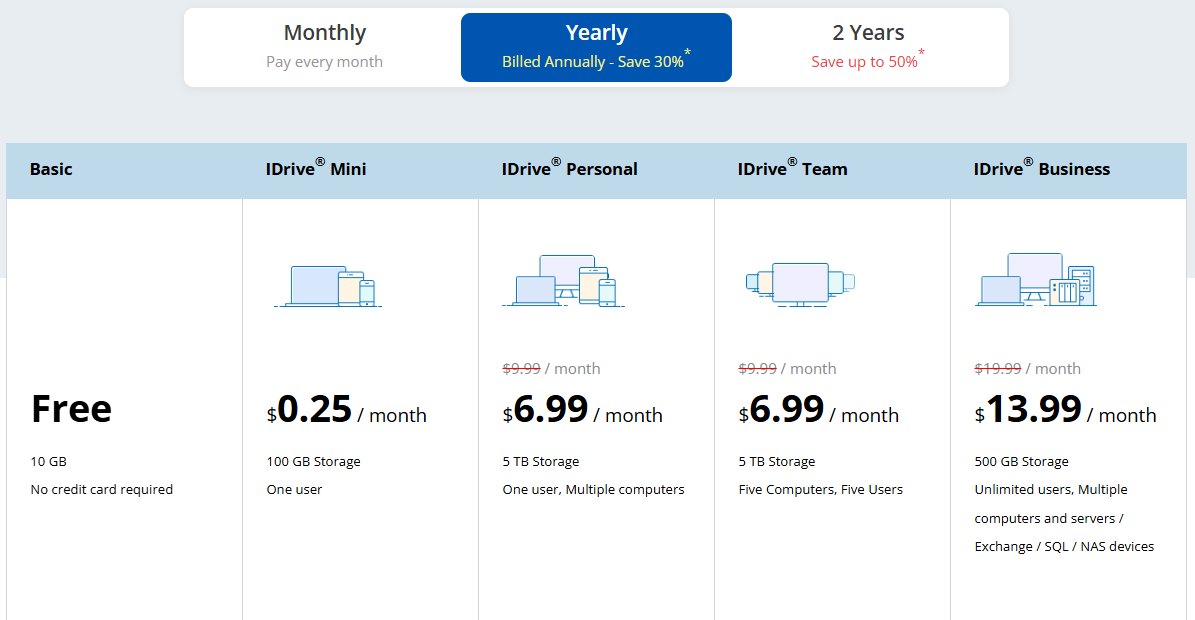
Let’s get to the part everyone cares about — IDrive pricing. And here’s the good news: IDrive is consistently one of the best values in cloud backup. 💸
🔹Personal Plans 👤
| Plan | Storage | Best For | First-Year Price | Regular Price |
|---|---|---|---|---|
| IDrive Mini | 100 GB | Light users, documents only | $2.95/year | $9.95/year |
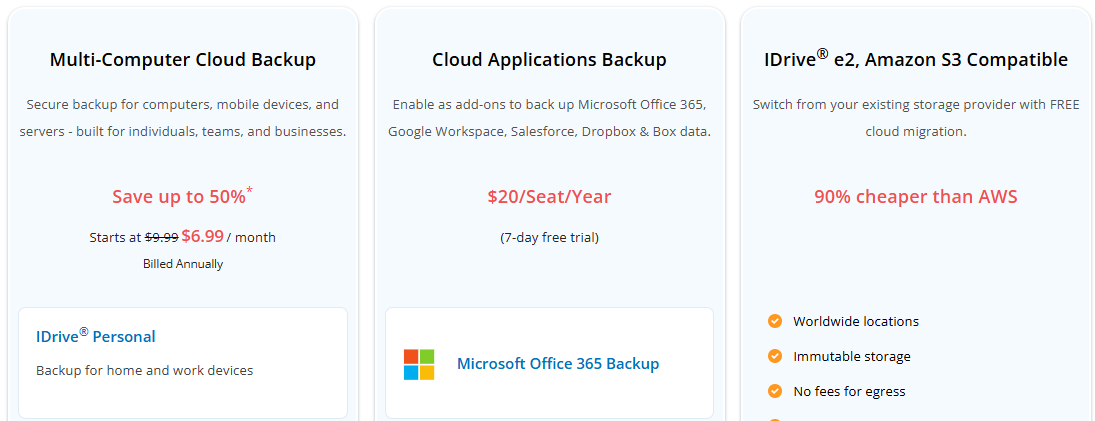
| IDrive Personal | 5 TB | Most individuals & families | $7.95/year* | $99.50/year |
| IDrive Team | 5 TB | Small teams (5 computers, 5 users) | $7.95/year* | $99.50/year |
* Based on typical first-year promo pricing. Actual prices may vary — always check official site.
Important: First-year discounts can save up to 50% or more, but the renewal price is higher. Always check what you’ll pay in year two.
🔹Business Plans 🏢
| Plan | Storage | Best For | Notes |
|---|---|---|---|
| IDrive Business | 250 GB – 12.5 TB+ | Small to medium businesses | Unlimited computers, unlimited users. Admin console for remote management. |
🔹Add-Ons 🧩
| Add-On | Price | What It Does |
|---|---|---|
| Server Backup | $5/month/server | Back up running servers and databases |
| Microsoft 365 Backup | $20/seat/year | OneDrive, Outlook, SharePoint, Teams |
| Google Workspace Backup | $20/seat/year (10 TB/seat) | Gmail, Drive, Calendar, Contacts |
| Synology/QNAP NAS Backup | Varies | Backup NAS devices |
IDrive offers 10 GB of free backup with no credit card required. It’s enough for documents and some photos, but not a full PC backup. Still, it’s one of the most generous free tiers in the industry.
Is IDrive Expensive? 💭
Compared to Backblaze ($99/year for one computer), IDrive’s Personal 5 TB plan is unbeatable for multi-device households. If you have 3 computers and 2 phones, IDrive is dramatically cheaper. 💪
4. Multiple Device Backup — PCs, Macs, Linux & Mobile 📱💻🐧
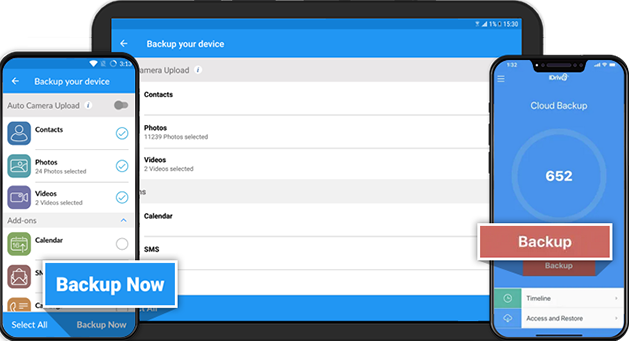
One of IDrive’s biggest selling points is unlimited device backup. Unlike Backblaze (which charges per computer) or Carbonite (which also limits devices), IDrive lets you back up as many devices as you want under a single account.
Here’s what’s supported: ✅
🔹Why This Matters for Real People 🧑💻
Imagine you’re a freelance photographer. 📸 You have a Windows desktop at home, a MacBook for travel, an iPad for client previews, and an Android phone for quick edits. With most backup services, you’d need four separate subscriptions expensive and annoying. 😫
With IDrive, you pay for one plan and back up everything. That’s simplicity and savings rolled into one. 💰
5. IDrive Backup Types — File Backup, Disk Image & Server Backup 🗂️💿🏢
IDrive isn’t a one-trick pony. It offers multiple backup types for different needs: 🎯
🔹File and Folder Backup 📂
The standard option. Select specific files or folders to back up. Perfect for most home users.
🔹Entire Drive Backup 💽
Back up an entire hard drive — operating system, applications, settings, everything. Great for disaster recovery.
🔹Disk Image Backup (Windows only) 🖼️
A complete snapshot of your system drive. If your computer crashes, you can restore everything — exactly as it was — to a new hard drive. No reinstalling Windows or apps. 🚀
🔹Server Backup 🖥️
Available as an add-on for Mini, Personal, and Team plans at $5/month per server. Supports Hyper-V, Oracle, SQL Server environments.
🔹NAS Backup (Synology, QNAP) 📦
Dedicated applications to back up your NAS devices to IDrive’s cloud. Available as an add-on.
🔹Microsoft Office 365 & Google Workspace Backup ☁️
Back up your OneDrive, Outlook, Exchange, SharePoint, Teams, Gmail, Drive, Calendar, Contacts. Starts at $20/seat/year with unlimited storage.
🔹Salesforce & Dropbox/Box Backup 🔄
Automated backups for Salesforce production environments and Dropbox/Box accounts.
Bottom line: Whether you’re a home user or an IT admin, IDrive has a backup type for you. 🎯
6. IDrive Security — Encryption, Private Key & Data Protection 🔒
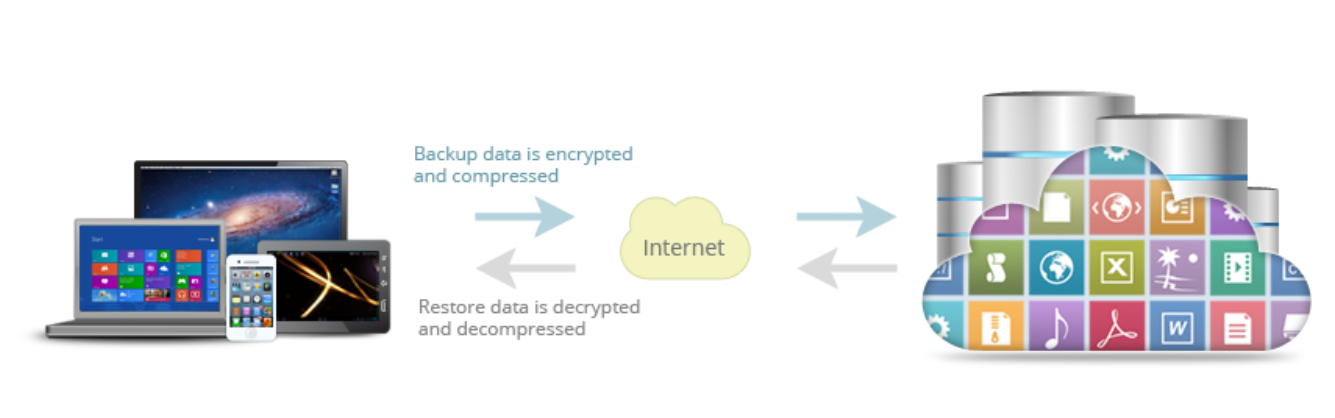
Let’s talk about security because if your backup isn’t secure, it’s not really a backup. 🛡️
Potential Privacy Concerns 🤔
IDrive is based in the United States, which is part of the Five Eyes surveillance network. Some privacy-focused users prefer services based in Switzerland or other privacy-friendly jurisdictions.
Verdict: For 99% of users, IDrive’s security is excellent. For privacy extremists, alternatives like Tresorit or Proton Drive may be better.
7. IDrive Sync, Sharing & Cloud Drive Features ☁️
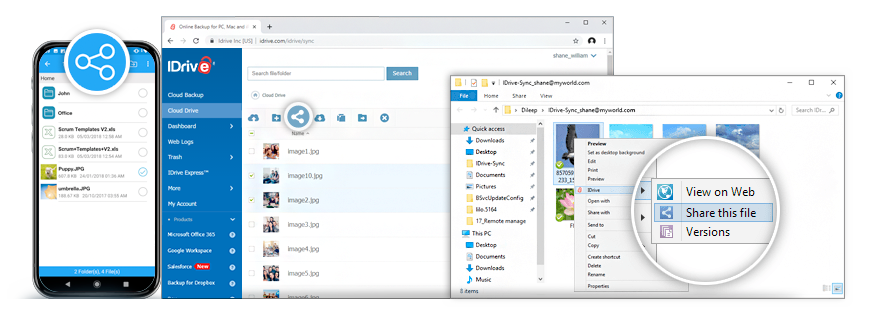
IDrive is mainly a cloud backup tool, but it also gives users useful sync and sharing features. You can sync files across linked devices, access them from the web, and share selected files when needed. This is helpful when you want backup protection plus basic cloud access in one account. IDrive also says users can link devices and sync files in real time.
- File Sync Across Devices 🔄 — You can keep important files available across your computer and other connected devices, which is useful for people working from multiple systems.
- File Sharing Links 📤 — You can share files through links, but IDrive is still stronger as a backup tool than a full collaboration tool like Google Drive or Dropbox.
- Web Access 🌐 — You can log in from a browser and access backed-up files, which is useful if your main device is unavailable.
8. IDrive Snapshots & Versioning — Ransomware Recovery Support 🛡️
IDrive’s Snapshots and Versioning feature is one of its strongest backup tools. It gives you a historical view of your data, so you can restore older versions if files are changed, corrupted, or affected by ransomware. IDrive states that it keeps up to 30 previous versions of backed-up files.
- Useful for Ransomware Recovery 🔐 — If ransomware encrypts your files, older clean versions may help you recover important data.
- Restore Previous Versions 🕒 — If you accidentally overwrite a file, you can go back and restore an earlier version instead of losing the original work.
9. True Archiving — How IDrive Handles Deleted Files 🗂️
IDrive’s True Archiving is helpful because deleted local files are not automatically removed from the cloud backup. This gives users extra protection against accidental deletion, especially when managing important documents, photos, videos, or business files.
- Extra Safety for Deleted Files 🛟 — If you delete something from your computer by mistake, it may still remain available in your IDrive backup.
- Manual Cleanup Needed 🧹 — Since old files can stay in the backup, users should occasionally clean storage to avoid filling up their plan unnecessarily.
- Best for Long-Term Backup 📦 — This feature is useful for users who want backup protection, not just file syncing.
10. IDrive Express — Physical Drive Backup & Restore 🚚
IDrive Express is a useful feature for people with large backups or slow internet. Instead of uploading or downloading huge files online, IDrive can ship a physical storage device to help with faster backup or restore. IDrive describes it as a quick backup and retrieval option through physical storage shipment with no bandwidth usage.
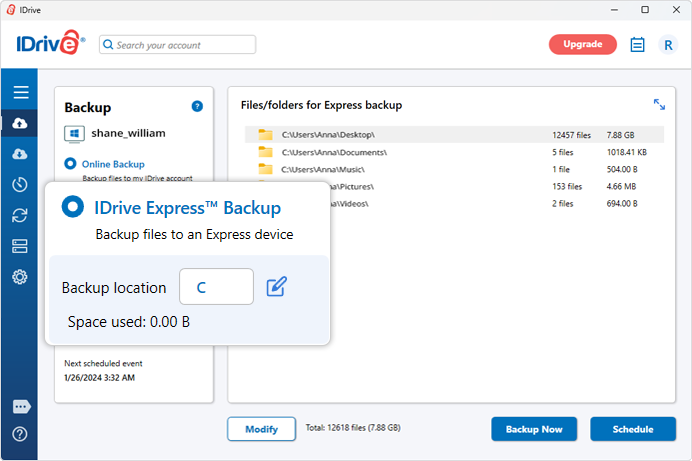
- Great for Large Data Backups 💾 — If you have hundreds of GBs or several TBs of files, IDrive Express can save a lot of upload time.
- Helpful During Emergency Restore ⚡ — If your system crashes and you need data back quickly, physical restore can be more practical than waiting for online downloads.
- Best for Businesses & Creators 🎥 — Video editors, photographers, agencies, and IT teams can benefit most from this feature.
11. IDrive Mobile App Review — iPhone & Android Backup 📱
IDrive also supports mobile backup, making it useful for people who store important photos, videos, contacts, and files on their phones. It works with iPhone, iPad, and Android devices, which adds more value for users who want one backup account for multiple devices. IDrive officially highlights backup support for iOS and Android along with PCs, Macs, Linux, and external drives.
- Photo & Video Backup 🖼️ — Mobile users can back up important media files so they are not fully dependent on phone storage.
- Cross-Device Access 🔁 — Files backed up from mobile can be accessed from other devices through the IDrive account.
- Good for Families & Creators 👨👩👧👦 — If multiple devices need protection, IDrive’s multi-device approach feels more valuable than single-device backup tools.
12. IDrive Business Backup — Teams, Servers & SMB Use 🏢
IDrive Business is built for companies that need more than personal backup. It can help small businesses, agencies, IT teams, and remote teams manage backup across multiple users, computers, and business systems. IDrive pricing also separates Team and Business plans, showing that it supports different business use cases beyond individual backup.
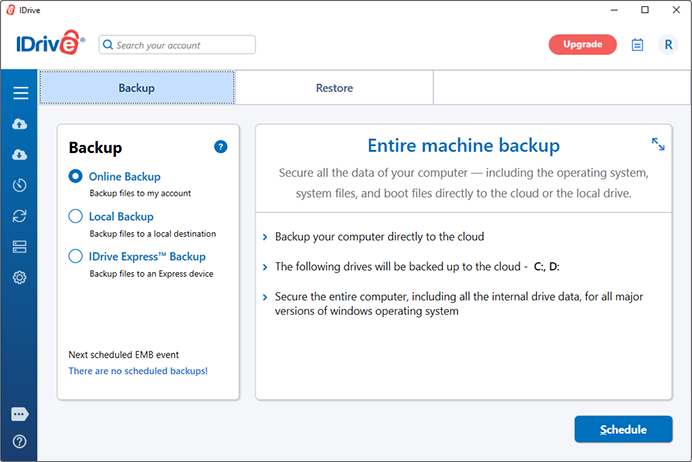
- Team & User Management 👥 — Businesses can manage multiple users and devices from one backup environment.
- Server & Business Backup 🖥️ — Useful for companies that need to protect office systems, workstations, and important business data.
- Best for SMBs 📊 — Small businesses that want backup, restore, security, and centralized control may find IDrive more practical than simple cloud storage apps.
13. IDrive Performance — Upload Speed, Restore Speed & Reliability ⚡
IDrive performance depends heavily on your internet speed, file size, device performance, and backup settings. The first backup can take time because all selected files must upload first, but later backups are usually faster because only changed files need updating. IDrive also supports scheduled and intelligent backups that detect file and folder changes.
- First Backup Can Be Slow ⏳ — Large photo libraries, videos, or business data may take hours or days depending on internet speed.
- Incremental Backups Save Time 🔁 — After the first backup, IDrive can detect changes and back up updated files more efficiently.
- IDrive Express Helps Large Restores 🚚 — For very large data recovery, physical drive restore can be easier than downloading everything online.
14. IDrive Ease of Use — Dashboard, App & Web Interface 🧑💻
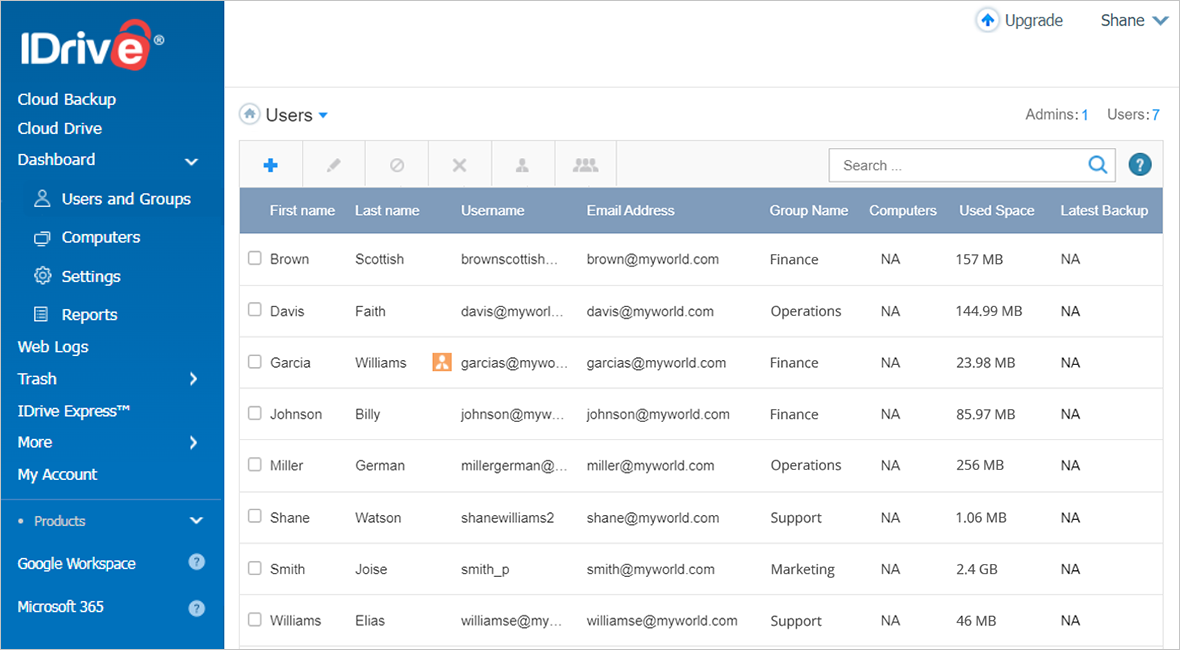
IDrive gives users desktop apps, mobile apps, and web access, so you can manage backups from different devices. It may not feel as simple as Google Drive or Dropbox for casual file sharing, but it offers more backup-specific control like scheduling, versioning, device management, and restore options.
- Desktop App 💻 — Good for setting backup schedules, selecting folders, and managing restore settings.
- Web Dashboard 🌐 — Useful for accessing files, checking backups, and restoring data from another device.
- Mobile App 📱 — Helpful for backing up phone data and accessing files while traveling.
- Learning Curve 📚 — Beginners may need some time to understand backup settings, but the extra control is useful for serious backup users.
15. IDrive Pros & Cons ⚖️
16. IDrive Alternatives — Best Options to Compare 🔁
IDrive is a powerful cloud backup tool, but it is smart to compare it with other options before choosing. Different tools are better for different needs. ☁️📊
| Alternative | Best For | Why Compare It |
|---|---|---|
| Backblaze 🔥 | Simple unlimited backup for one computer | Good if you want automatic backup without managing storage limits |
| Carbonite 🧊 | Basic automated cloud backup | Good for users who want simple set-it-and-forget-it backup |
| Dropbox Backup 📦 | Dropbox users | Better if you already use Dropbox for file sync and sharing |
| OneDrive 🪟 | Microsoft users | Useful if you already use Microsoft 365, Windows, and Office apps |
| Google Drive 🌐 | File sync and collaboration | Better for sharing files and working with Google Docs |
Backblaze focuses on unlimited computer backup with monthly, yearly, and two-year billing options. Carbonite also promotes unlimited encrypted automatic backup for one flat price. Dropbox Backup is useful for users already inside the Dropbox ecosystem, while OneDrive works well for Microsoft 365 users who want cloud storage and basic file backup across devices.
17. Who Should Use IDrive? — Best Use Cases 🎯
✅ Best for IDrive:
- 👨👩👧👦 Families — back up 3+ computers and multiple phones under one account
- 💻 Freelancers & creators — protect work across laptop, desktop, and phone
- 🏢 Small businesses — team backup, server backup, admin controls
- 📸 Photographers & videographers — large storage needs at affordable prices
- 🧑💻 IT admins — remote management for multiple client devices
- 🏥 Healthcare & legal practices — HIPAA-compliant options available
- 🌍 Anyone who wants true backup (not just sync) with versioning and snapshots
❌ Who should NOT use IDrive:
- Users who only need simple file syncing — use Dropbox, Google Drive, or OneDrive instead
- Teams focused on real-time collaboration — IDrive is a backup tool first, not a collaboration platform
- Privacy extremists who avoid US-based services and prefer end-to-end encryption by default (look at Tresorit or Proton Drive)
- Users who dislike managing backup settings — Backblaze is more “set and forget”
- Anyone with a single computer and massive (10+ TB) data — Backblaze’s unlimited plan may be cheaper
18. IDrive Customer Reviews & Expert Ratings ⭐
IDrive receives mostly positive feedback from experts and users for its multi-device backup, strong storage value, security options, and recovery features. ☁️🔐
What Users Like ✅
- Backs up multiple devices under one account 💻📱
- Good value for large storage plans 💰
- Supports PCs, Macs, mobiles, and external drives 💾
- Strong encryption and private key option 🔐
- Snapshots and versioning help with file recovery 🛡️
- Useful for families, freelancers, and small businesses 🏢
Common Complaints ⚠️
- Not as smooth as Dropbox or Google Drive for collaboration 🔄
- Interface may feel outdated 🖥️
- First backup can be slow ⏳
- Speed depends on internet connection 🌐
- Renewal pricing may confuse some users 💳
19. Final Verdict — Is IDrive Worth It in 2026? 🏁
After digging deep into IDrive features, IDrive pricing, IDrive cloud backup capabilities, security, and real user feedback, here’s my honest take:
👉 IDrive is absolutely worth it for most people especially if you have more than one computer, a family with multiple devices, or a small business with employees.
The combination of unlimited device backup, 5 TB of storage for under $10/year (first year), snapshots for ransomware recovery, and IDrive Express for physical restores is genuinely hard to beat. 💪
👉 If you have exactly one computer with massive amounts of data (10+ TB), Backblaze’s unlimited plan might be simpler and cheaper.
👉 If your primary need is real-time file syncing and collaboration (like Google Docs), stick with Dropbox, Google Drive, or OneDrive. IDrive is a backup tool first, not a collaboration platform.
Final Recommendation ⭐
4.6 / 5 – Highly recommended for families, freelancers, creators, and small businesses. Deduct half a star for:
- ⚠️ First backup speed (use IDrive Express if needed)
- ⚠️ Renewal pricing surprise (always check year-two rates)
- ⚠️ US jurisdiction (mitigate with private encryption key)
Your next step: Compare the plans and choose the IDrive backup option that fits your devices and storage needs. Start with the free 10 GB tier (no credit card required) to test it out you can always upgrade later. 🚀
RELATED ARTICLES:-
20. FAQs❓
1. Is IDrive good for cloud backup? ✅
Yes, IDrive is a strong option for cloud backup because it supports multiple devices, versioning, security, mobile backup, and restore options.
2. Is IDrive better than Backblaze? 🔄
IDrive is better if you want multi-device backup. Backblaze is simpler if you only need backup for one main computer.
3. Does IDrive back up multiple computers? 💻
Yes, IDrive lets you back up multiple PCs, Macs, Linux devices, phones, and external drives under one account.
4. Can IDrive recover deleted files? 🗂️
Yes, IDrive’s true archiving can keep deleted files in cloud backup, so accidental deletion may be recoverable.
5. Is IDrive good for businesses? 🏢
Yes, IDrive Business is useful for teams, agencies, IT users, and small businesses that need centralized backup and restore options.

👨💻 Hi, I’m Anas Khan, a digital marketing expert with over 5 years of experience in e-commerce and affiliate marketing. I specialize in finding the best coupon codes 💸, Black Friday promotions 🛍️, and discount offers 💥 to help you save big!
I’ve dedicated myself to staying on top of the latest trends 📈 in online deals, so I can offer you the most reliable, tested advice. Whether you’re looking for promo codes or exclusive Black Friday deals, you can trust that my recommendations are based on solid research and personal expertise 🏆.